

Analysis of the Current Situation
I had the opportunity to create a time-recording system for Tomasz, a Graphic Designer working in the GAMEDEV industry. Tomasz initially used a combination of Excel and a notepad to manage his time. This setup required external programs to track time spent on tasks, and at the end of each month, Tomasz would manually summarize his recorded times and transcribe them into a separate sheet to generate a PDF report for clients. The following issues needed to be addressed:
- Eliminate the need for an external stopwatch.
- Eliminate the necessity to create new sheets each month and move away from Excel entirely.
- Simplify the generation of reports.
- Improve the visibility of current workload and task progress.
During our discussions, Tomasz and I agreed that the system should be as simple and intuitive as possible, while still allowing for the management of multiple projects and clients. The tool also needed to support task scheduling for Tomasz’s personal projects.
Project Flow
Step 1: Defining the Document Structure
I began by creating a document with a table to store information about Tomasz’s clients. This table included basic communication data, ensuring all relevant information was centralized, which would also support future automation for sending reports.
Step 2: Managing Open Tasks
The next document was designed to handle currently open tasks, divided into two parts:
- Task List: A table displaying only open tasks and those starting within the next 30 days. Tasks are added directly to this table, bypassing the need for a form. Key fields include:
- Task Name: A custom string for identifying the task.
- Principal: A checkbox linked to the “Principals” table, allowing selection only from predefined clients.
- Record Time: A “Start” button that logs the start time in a hidden column and disables itself if another task’s stopwatch is running.
- Current Stopwatch: Displays the running time when the “Start” button is pressed.
- Stop Time: A “Stop” button that logs the end time and transfers the information to the time log table.
- Task Start: Scheduled start date for future tasks, showing only those within 30 days.
- Deadline: Defines a task’s due date, with overdue tasks highlighted in red.
- Time Target: Manually defined time budget for tasks with time constraints.
- Time Sum: Automatically calculated sum of recorded times, with exceeded budgets highlighted in orange.
- Completed: A checkbox that, when checked, hides the task from view.
- The table is designed with several hidden columns for automation, including:
- Start of Registration: Auto-fills the start time.
- Transfer Time: Automates the transfer of time data to the log.
- Clean Stopwatch: Clears cells after data transfer.
- Time Log Table: This section logs all time records for open tasks. Tasks marked as completed are automatically removed from this view. Key fields include:
- Task: Auto-filled task name.
- Start of Job: Auto-fills the start date and time, with rows sorted by this column.
- End of Job: Auto-fills the end time, with the option for manual adjustment.
- Running Time: Calculates the difference between start and end times with minute accuracy.
Step 3: Full History of Time Recording
A separate document records the full history of time logs, grouped by month in descending order, with no filters applied. This document serves as a reference for verifying times of past tasks.
Step 4: Report Generator
To simplify report generation, a dedicated tab was created where Tomasz can select the Principal and date range. The table and summary data are automatically generated, making the report creation process quick and easy.
Step 5: Landing Page Creation
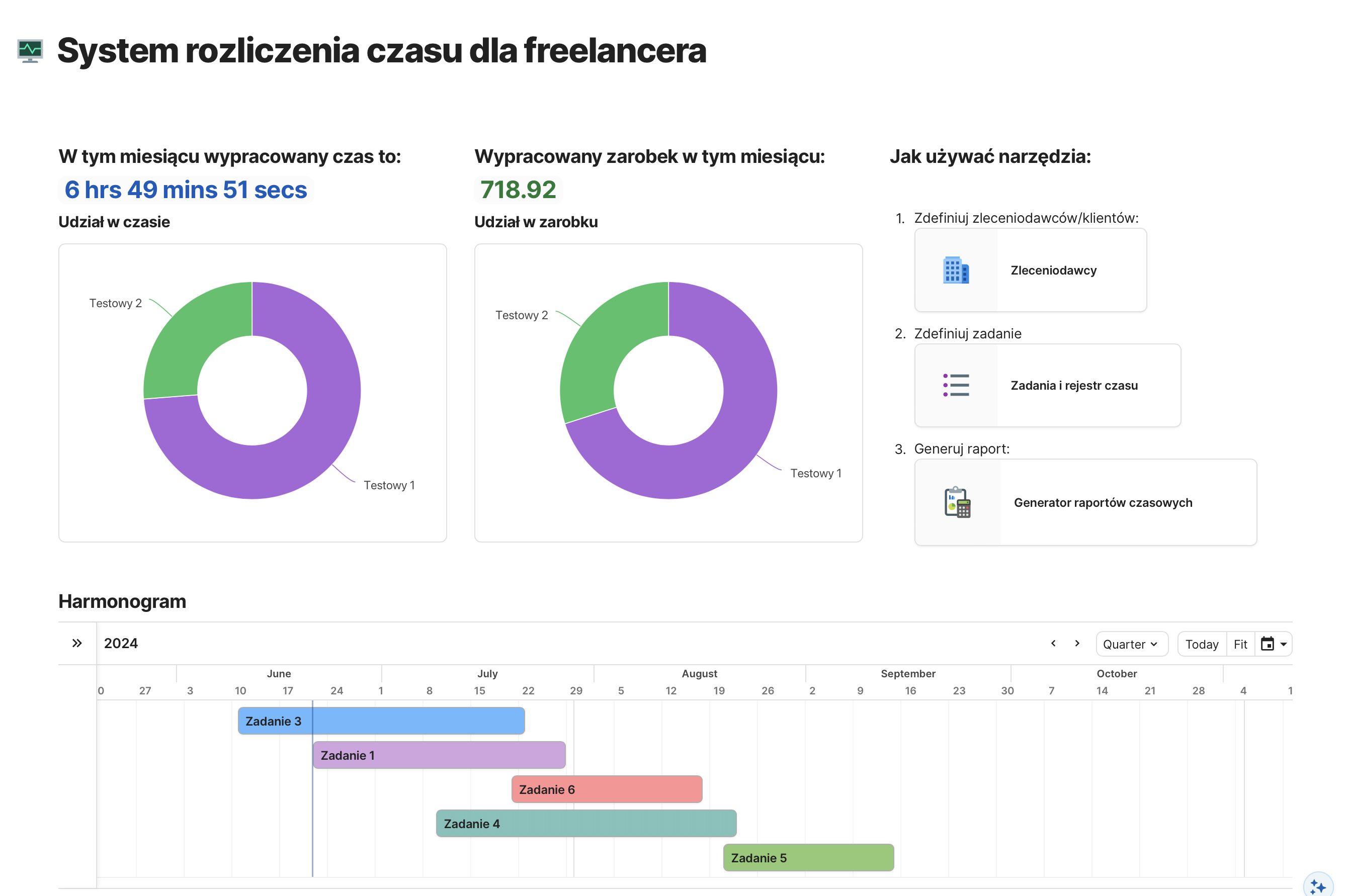
Finally, I created a landing page for the tool that displays key statistics and links, visible upon launching the application. This includes information on time worked, value earned, and the schedule of open tasks.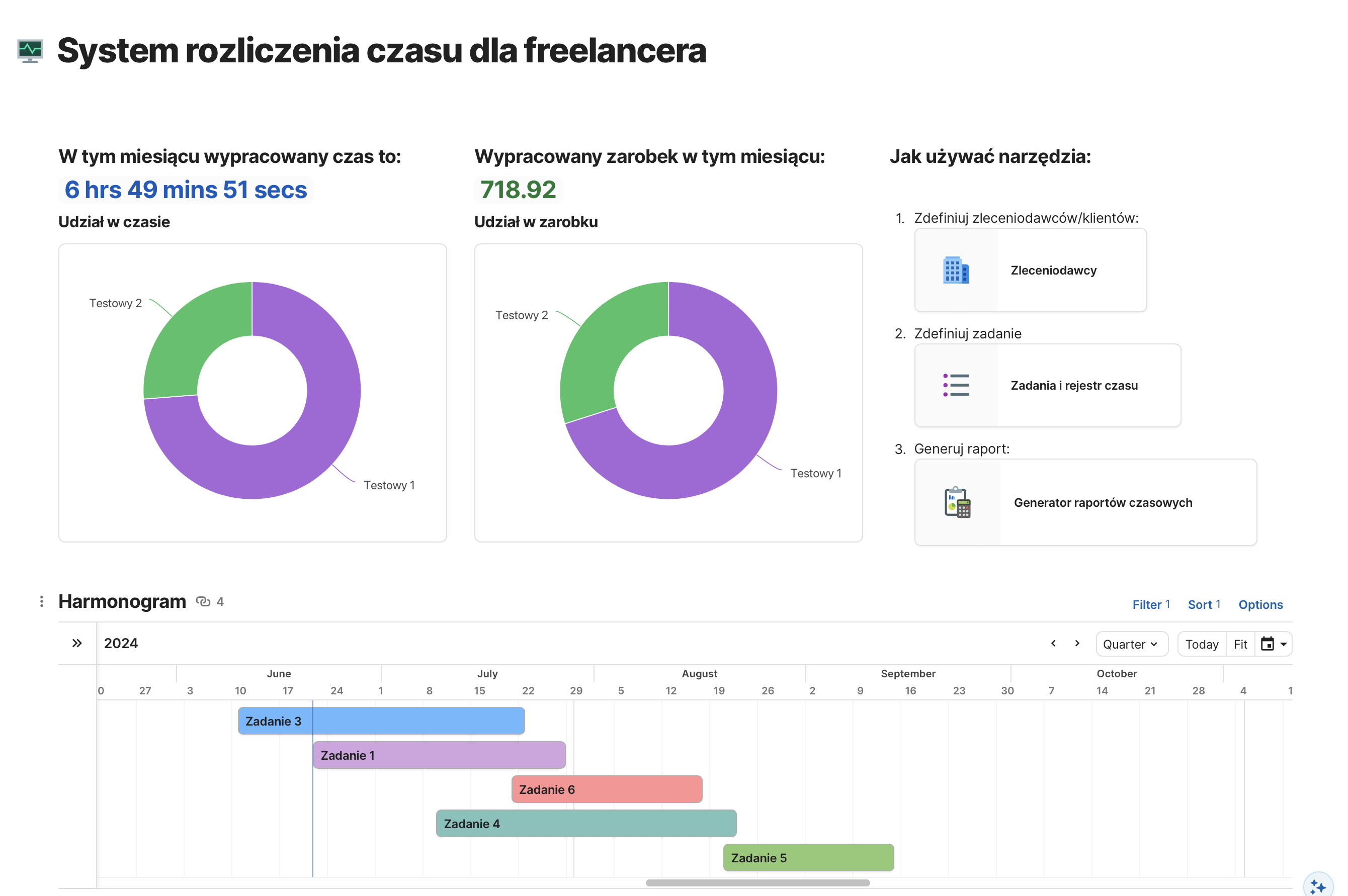
Summary of Project Objectives
- Eliminate the external stopwatch: Achieved by integrating time recording directly into the document.
- Eliminate the need to create new sheets each month and move away from Excel: Tomasz now navigates through multiple documents within Coda.io, with no need for additional sheets.
- Simplify report generation: Reports are now easily generated from a single tab by selecting the client and date range.
- Improve the visibility of current workload: A schedule showing the number of open tasks on a timeline is visible on the dashboard.
- Create a simple, intuitive system: The system was designed to be user-friendly, with separate views for tasks and time logs, avoiding the need to filter a single table.
This project successfully transitioned Tomasz from a manual, time-consuming process to a streamlined, automated system, significantly improving his workflow and efficiency.